Private beta · Mac first
Know what your agents are really doing. Rooted in reality.
A small recorder and a desktop app for people who work with coding agents. See what your agents are running right now, what they left running after the chat ended, and where they connected. The record stays on your machine.
- Claude Code today, Codex next
- Mac first, Windows next
- Free during the beta
- A Claude Code chat starts~/code/shop-api
- node startslistening on :3000
- python starts~/code/shop-api/scripts
- python → api.github.comnew
- node → registry.npmjs.org×12
- python exitsran 4 min
- The chat ends2 h 5 min ago
- node is still runningon :3000, 2 h after the chat ended
The app
Three views, one window.
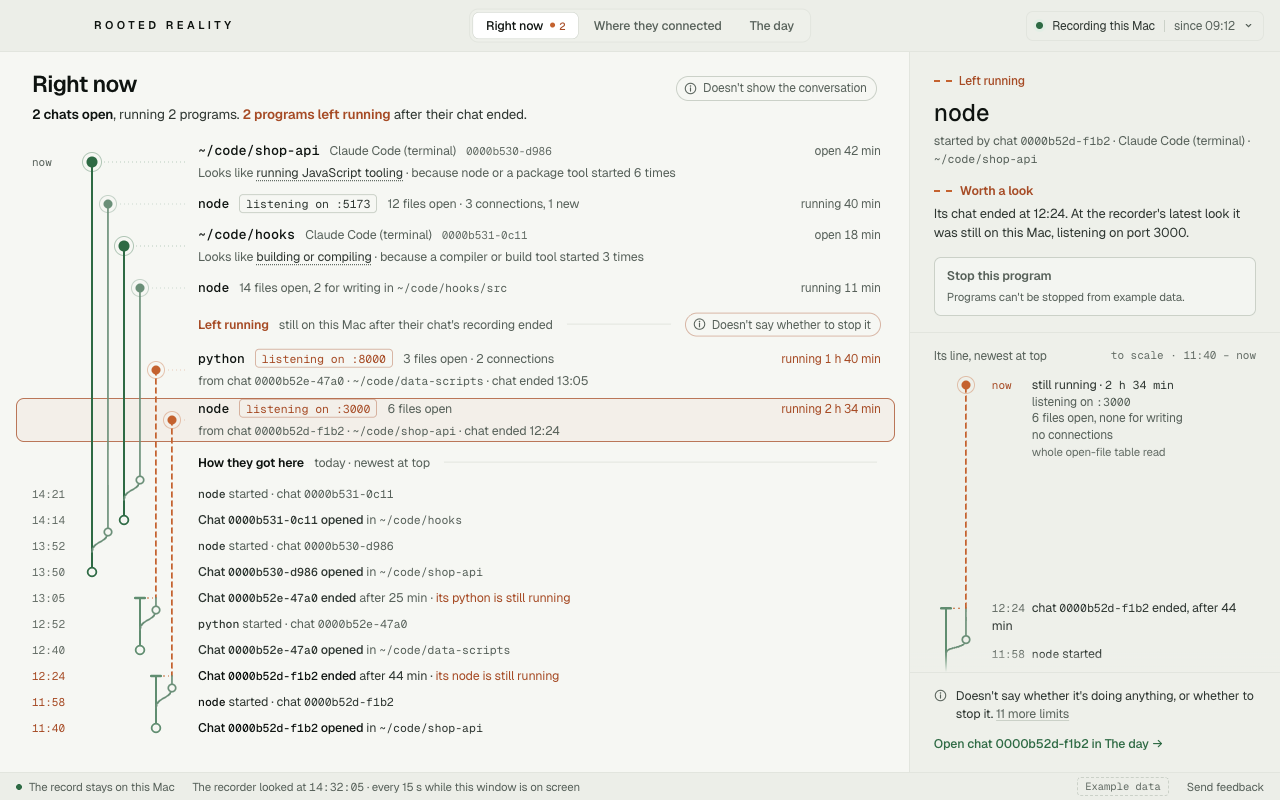
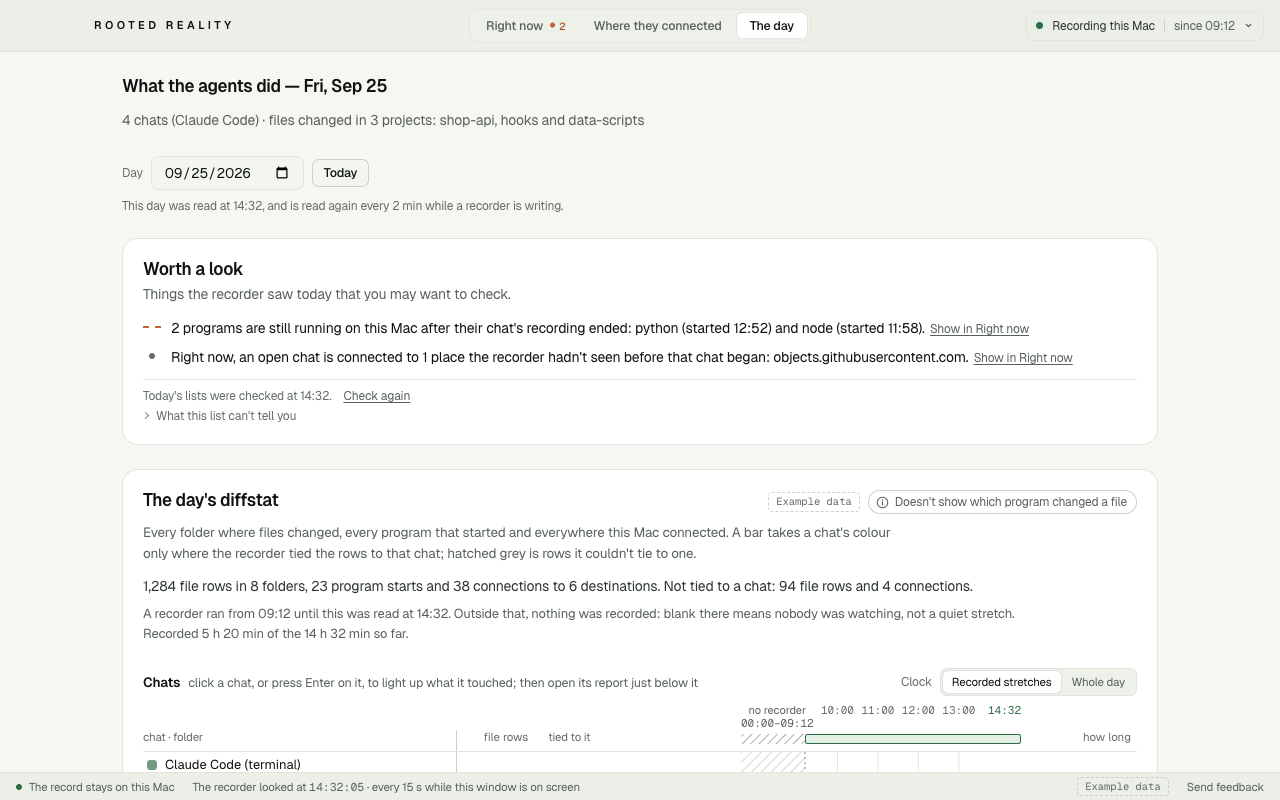
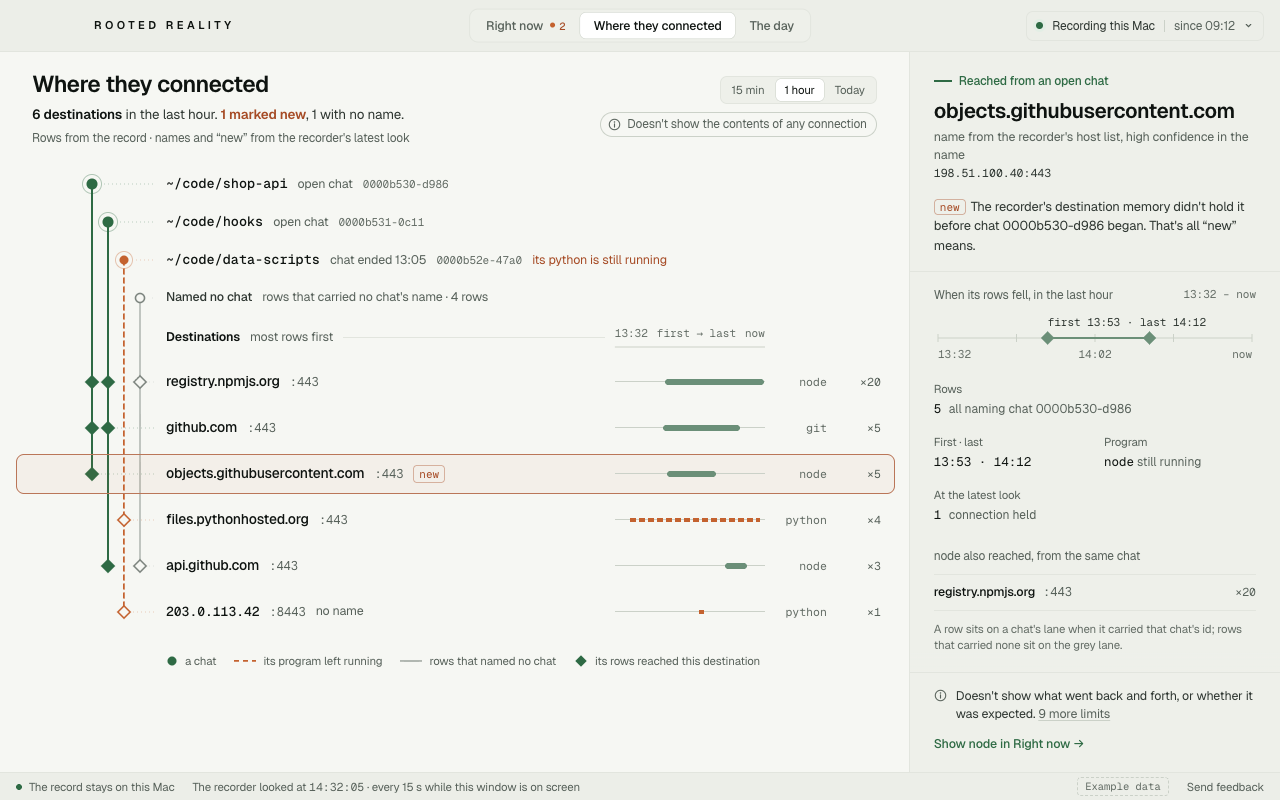
The desktop app reads the record on your computer and shows it three ways. If a program is still running after its chat ended, you can stop it from the app after you confirm. It doesn’t stop anything on its own.
Actual app interface shown with synthetic example data. No personal record was used.
See The day and Where they connected in the app
What it shows
Three things, on your own machine.
Each view says what it doesn’t show. It’s a witness, not a judge.
Right now
Which agent chats are open, and the programs each one is running on your machine, as they run.
For example: node · listening on :5173 · 41 min
Doesn’t showyour conversation with the agent. It shows what ran, not what was said.
Left running
What is still running after a chat ended, like a dev server holding a port or a background job that never stopped.
For example: node · holding :3000 · still running 2 h after its chat ended
Doesn’t showwhether a program should be stopped. It shows what is still running; that call stays yours.
Where they connected
The destinations the agents’ programs reached from this machine, named where the recorder can name them, with a “new” mark on ones it hasn’t seen before.
For example: python · api.github.com · new
Doesn’t showthe contents of those connections. It records where, not the data that went back and forth.
Local-first
The record stays on your machine.
What your agents did is written to a record on your own computer, and the desktop app reads it there. Nothing from the record leaves your machine.
Your machine
Stays here: Programs, folders, file names, destinations and times. The desktop app reads the record where it is. We don’t upload it.
Nothing from the record leaves your machine. What does go out:
Host-name lookups
To put names on addresses, the recorder looks up a short, fixed list of well-known host names. The lookups carry nothing from your record.
Update checks
The app checks for new versions of itself. The check carries nothing from your record.
A ping on your phone Planned
“Needs your attention” and the name of a category, like “left running”, sent through Apple’s or Google’s push service. No program names, files, folders or addresses. Not built yet.
The details, line by line: what leaves your machine.
How it works
A small recorder and a desktop app.
A small recorder on your computer
It notes the programs your coding agents start, how long they keep running, the folders they work in, the names of files changed while a chat is open, and where they connect, and writes that to a record on your machine.
A desktop app
It reads that record on your computer and shows it as three views: right now, left running, and where they connected.
- Planned
A ping on your phone
A content-free “needs your attention” ping that names only the category. Not built yet.
Where it runs
Mac first, Windows next.
- Mac
- First · private beta forming
- The first version is for Mac, and its private beta is forming now.
- Windows
- Next
- Windows comes after Mac. Pick Windows on the form so we know you're waiting for it.
- Agents
- Claude Code today, Codex next
- Use something else? Tell us on the form.
- Price
- Free during the beta
- Free during the beta; a one-time Pro purchase later.
Questions
Frequently asked
What does it record?
The programs your coding agents start on your computer, when they start and stop, the folders they work in, the names of files changed while a chat is open (reads aren't recorded, except for a few sensitive places), and where they connect. That record is what the three views are built from.
What does it never record?
It doesn't keep a copy of your conversations with the agent, what's inside your files, or the contents of network traffic. It keeps names and places, never what's inside them.
Does anything leave my machine?
Nothing from the record does. It stays on your computer, and the desktop app reads it there. Three small things go out, and none of them carries the record: the recorder looks up a short, fixed list of well-known service names to put names on addresses; the app checks for updates; and, once it's built, your phone gets a content-free “needs your attention” note that names only the category.
Which agents does it work with?
Claude Code today. Codex is next. If you use something else, such as Cursor, tell us on the form; it helps us decide what comes after.
What does it cost during the beta?
Nothing. It's free during the beta. Later there will be a one-time Pro purchase, and a free tier will stay.
Private beta
Join the waitlist.
The private beta is forming now, Mac first. Tell us which agents you use and on which computer, and we’ll email you when there’s room.
Free during the beta; a one-time Pro purchase later.